How to List Your Property on Bookingdham Using PMS Integration
Admin ⦁ 25 August 2026 ⦁ 9:00 min read
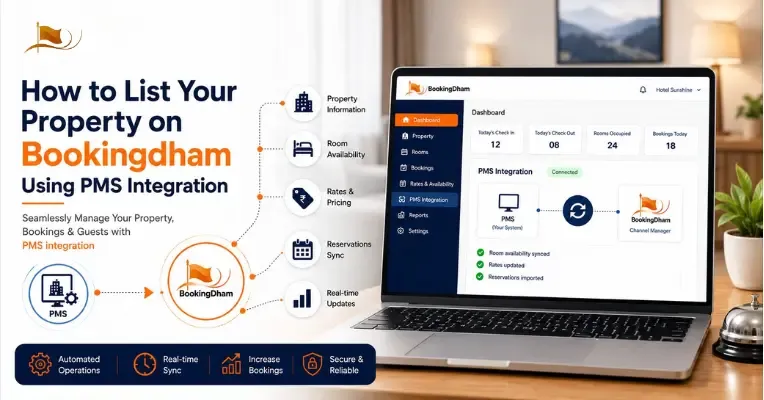
Managing a hotel, guest house, resort, or dharamshala today involves more than accepting reservations. Property owners need to keep room availability, prices, guest information, booking status, and inventory updated across different channels.
When these tasks are handled manually, even a small change can require multiple updates. A room may be booked through one channel while its availability still appears open somewhere else. This can create extra work for staff and increase the risk of booking or inventory errors.
This is where Bookingdham PMS integration can help.
By connecting your property's Property Management System (PMS) with Bookingdham, you can create a more organized workflow for managing your property information, room inventory, rates, and bookings.
In this guide, we explain how to list your property on Bookingdham using PMS integration, what information you need, how room mapping works, and how property owners can maintain their online listing more efficiently.
What Is Bookingdham PMS Integration?
Bookingdham PMS integration is the process of connecting your property's Property Management System with Bookingdham so that relevant property and reservation information can work together through a connected workflow.
A PMS is software used by hotels and other accommodation businesses to manage day-to-day operations such as:
- Room availability
- Reservations
- Room inventory
- Guest information
- Room rates
- Check-in and check-out
- Booking status
- Property operations
For a property owner, the main advantage of integration is reducing repetitive manual work.
Instead of maintaining every booking and inventory update separately, your PMS can act as the central operational system while Bookingdham becomes one of your online distribution and booking channels.
The exact synchronization capabilities depend on the PMS provider and the integration setup available for the property.
Why List Your Property on Bookingdham?
Before connecting a PMS, you first need a complete Bookingdham property listing.
Bookingdham provides an online platform for hotels, dharamshalas, guest houses, cottages, and other accommodation providers, particularly around pilgrimage and religious destinations. The platform currently promotes free property listing, zero commission for property owners, dedicated support, and channel manager integration.
A property listing gives travelers an opportunity to discover your accommodation when they are searching for a place to stay.
Your listing can include important information such as:
- Property name
- Location
- Room types
- Room facilities
- Pricing
- Availability
- Property photos
- Amenities
- Check-in and check-out information
- Property policies
- Nearby temples and attractions
The more complete and accurate your listing is, the easier it is for travelers to understand your property before booking.
What Is a Property Management System?
A Property Management System, or PMS, is a software platform that helps accommodation businesses manage their daily operations from one place.
Depending on the system, a PMS may support functions such as reservation management, room allocation, inventory, guest records, billing, reports, and occupancy tracking.
For example, Bookingdham's PMS environment includes operational functions such as an Operations & KPI Dashboard, property listing configuration, room allocation, front-desk reservations, booking reports, billing, settlements, and payment analytics.
These features are useful for property owners who want to move away from disconnected spreadsheets and manual processes.
However, this article is focused specifically on using PMS integration to list and manage your property on Bookingdham, rather than explaining every PMS feature in detail.
How Bookingdham PMS Integration Fits Into Your Booking Workflow
A typical hotel booking workflow may look like this:
Property setup → Room configuration → PMS connection → Room mapping → Rates & inventory → Testing → Live bookings → Ongoing monitoring
The PMS remains important for managing the property's operational data, while Bookingdham provides an additional online channel through which travelers can discover and book the property.
For properties managing multiple booking sources, this type of connected workflow can make inventory management more structured.
How to List Your Property on Bookingdham Using PMS Integration
The exact technical process can vary depending on the PMS being used. However, property owners can generally follow these stages.
Step 1: Prepare Your Property Information
Before starting your Bookingdham property listing, collect all the information that travelers need.
This includes:
- Property name
- Complete address
- Contact details
- Property category
- Room categories
- Number of rooms
- Occupancy
- Room rates
- Amenities
- Property photographs
- Check-in and check-out information
- Cancellation policies
- Guest policies
- Nearby attractions
Make sure the information is accurate before submitting it.
Your property name and room names should also be consistent between your PMS and Bookingdham. Consistent information makes the mapping process easier later.
Step 2: Register and Create Your Property Listing
The next step is to create your Bookingdham hotel listing. Add your property's basic details and provide accurate information about the accommodation. Your listing should clearly communicate what guests can expect.
For example, if you operate a dharamshala, mention the accommodation type clearly. If you operate a hotel near a major pilgrimage destination, mention relevant nearby attractions and temples.
High-quality photographs are also important. Include genuine images of rooms, bathrooms, common areas, property entrances, and other important facilities.
Bookingdham's property-owner information states that property listing is available without commission charges and includes dedicated support.
Step 3: Configure Your Room Types
After creating the property, configure the rooms that you want to sell through Bookingdham.
For example:
- Standard Room
- Deluxe Room
- Family Room
- Four-Bed Room
- Six-Bed Room
- Suite
Each room should have accurate information about occupancy, bed type, facilities, pricing, and availability.
Avoid creating duplicate or confusing room names.
For example, if your PMS calls a room Deluxe Double AC, use a matching or clearly corresponding name on Bookingdham.
Step 4: Connect Your PMS
Once the property and room structure are ready, the PMS integration stage can begin.
The PMS provider and Bookingdham integration setup may require specific credentials, configuration, or mapping information.
The important objective is to establish a clear connection between the room types in your PMS and the corresponding room types on Bookingdham.
For example:
PMS: Deluxe Double AC
Bookingdham: Deluxe Double AC
This mapping helps ensure that availability and other relevant information are associated with the correct room category.
If you are unsure whether your PMS is compatible or how the connection should be configured, contact Bookingdham support before changing live inventory settings.
Step 5: Map Room Inventory
After connecting the PMS, map your room inventory correctly. Hotel inventory management is important because your available rooms need to be represented accurately across your booking channels.
For example, if your property has:
20 total rooms – 5 booked = 15 available rooms
The relevant inventory should reflect that availability according to the capabilities of the connected systems.
Incorrect mapping can cause problems such as rooms appearing unavailable when they are available, or availability remaining open after rooms have already been booked.
Take time to check each room category before making the connection live.
Step 6: Configure Rates and Availability
Once room mapping is complete, review your rates and availability.
Check:
- Room prices
- Occupancy
- Available inventory
- Rate plans
- Minimum-stay rules, if applicable
- Booking restrictions
- Seasonal pricing
- Special rates
Your PMS may be used to manage rates and inventory depending on the integration setup.
Accurate pricing is just as important as accurate availability. A traveler should see information that matches what your property can actually provide.
Step 7: Test the Integration
Do not immediately assume that the connection is working correctly. Perform a test before relying on the integration for live bookings.
Check whether:
- The correct room types appear.
- Availability is correct.
- Rates are correct.
- Room occupancy is correct.
- Booking information is transferred correctly.
- Inventory changes after a reservation.
- Cancellations or modifications are handled correctly according to the integration.
Testing is particularly important for properties that already receive bookings from multiple channels.
Step 8: Start Managing Your Booking Workflow
After testing is complete, your PMS can become the central operational tool for managing your property. Your team can continue using the PMS for functions such as room allocation, reservations, guest information, reports, billing, and occupancy monitoring, while Bookingdham provides an additional online booking channel.
Bookingdham's PMS interface also includes functions such as a Front-Desk Manual Reservations workflow, OTA Channel & Platform Sync, Allocation & Occupancy Analytics, Detailed Booking & Audit Reports, Check-out Billing & Settlements, and Payment & Gross Revenue Analytics.
These functions belong to the broader property-management workflow; the specific features available to a property depend on the applicable PMS setup.
What Should Your Bookingdham Property Listing Include?
PMS integration can improve operational management, but your listing itself still needs to be complete.
Accurate Property Details
Clearly state the property name, location, accommodation type, contact details, and other important information.
Clear Room Information
Each room should have an understandable name, occupancy information, bed details, facilities, and applicable pricing.
Good Property Photos
Use clear and genuine photographs. Include rooms, bathrooms, reception areas, common spaces, and exterior views where relevant.
Location Information
Mention nearby temples, railway stations, bus stands, pilgrimage sites, and other useful landmarks when appropriate.
This can be particularly valuable for Bookingdham because many travelers use the platform when planning pilgrimage trips.
Amenities
Only mention facilities that your property actually provides, such as Wi-Fi, parking, air conditioning, hot water, dining facilities, or other services.
Policies
Clearly communicate check-in and check-out times, cancellation terms, guest requirements, and other important policies.
Benefits of PMS Integration for Hotels
The main purpose of PMS integration for hotels is to create a more efficient operational workflow.
Reduce Repetitive Manual Updates
Without integration, staff may have to update the same information in several systems. A connected workflow can reduce unnecessary data entry.
Improve Hotel Inventory Management
A centralized inventory process makes it easier to keep track of available rooms.
Reduce the Risk of Availability Errors
When multiple channels are involved, outdated information can create booking problems. Properly configured synchronization can help reduce these risks.
Save Staff Time
Hotel staff can spend less time repeating administrative updates and more time managing guests and daily operations.
Improve Booking Management
A connected hotel booking management system can bring reservations, room information, and operational data into a more structured workflow.
Support Online Distribution
A Bookingdham hotel listing gives property owners another channel through which travelers can discover their accommodation.
Bookingdham PMS Features That Support Property Operations
PMS integration should not be confused with the entire PMS product. The integration connects relevant data between systems, while the PMS itself can support wider property-management activities.
Bookingdham's PMS interface shown for property operations includes several areas:
Operations & KPI Dashboard
The dashboard provides an operational view of property activity and performance information, helping teams monitor day-to-day operations.
Property Listing Configuration
Property managers can configure important listing information, including property-level details, contact information, address, images, policies, and property categories.
Compliance & Listing Review Auditor
A review and compliance workflow can help property teams check listing information before it is published or maintained.
Visual Room Allocation Matrix
A visual room allocation interface helps teams view room status and manage room assignments in a structured way.
Front-Desk Manual Reservations
For bookings handled directly by the property, front-desk staff can use a manual reservation workflow rather than relying only on online bookings.
OTA Channel & Platform Sync
Channel synchronization helps properties manage booking information across connected distribution platforms according to the available integration setup.
Allocation & Occupancy Analytics
Property teams can review room allocation and occupancy information to better understand how rooms are being utilized.
Detailed Booking & Audit Reports
Booking and audit reports can provide a more detailed record of reservation activity, helping property teams review booking information.
Check-out Billing & Settlements
Billing and settlement functions help organize guest charges and payment-related records during the checkout process.
Payment & Gross Revenue Analytics
Payment and revenue reporting can help property owners review financial activity and understand booking-related revenue.
These features support the wider PMS workflow. If your goal is specifically to list property on Bookingdham using PMS integration, focus first on property setup, room configuration, mapping, rates, availability, and testing.
Tips for a Successful Bookingdham Hotel Listing
Keep Your Listing Accurate
Update property details, prices, room information, facilities, and policies whenever something changes.
Use Consistent Room Names
Keep room names consistent between your PMS and Bookingdham to make mapping easier.
Review Inventory Regularly
Even with integration, property managers should monitor inventory and investigate unexpected differences.
Keep Photos Current
Replace outdated photographs when rooms, facilities, or property areas change.
Review Your Listing Before Going Live
Check every important field before publishing or activating your property.
Monitor Your Booking Workflow
After integration, regularly review reservations, room allocation, availability, and reports to identify potential synchronization issues early.
Is PMS Integration Suitable for Every Property?
Not necessarily.
A small guest house with a few rooms may be able to manage reservations manually. A larger hotel with multiple room types and booking channels may benefit more from an integrated PMS workflow.
If you already use a PMS, first check whether it supports the required connectivity and whether the necessary room, rate, inventory, and booking information can be synchronized.
If you do not currently use a PMS, you can still explore the available Bookingdham property-management options and choose a workflow that matches your operational requirements.
List Your Property on Bookingdham
Getting your property online is only the first step. Keeping your room information, availability, rates, and booking data organized is what helps create a reliable online booking workflow.
With Bookingdham property listing, accommodation providers can present their property to travelers searching for hotels, dharamshalas, guest houses, and other stays. Bookingdham also promotes free listing and zero commission for property owners, along with property-management and channel-management capabilities.
If you already use a Property Management System, Bookingdham PMS integration can help connect your existing operational workflow with your Bookingdham presence, subject to the compatibility and integration setup available for your property.
Whether you manage a hotel, guest house, resort, or dharamshala, start with accurate property information, properly mapped rooms, correct inventory, and reliable rates.
Ready to bring your property online? List your property on Bookingdham and explore the available property-management and PMS options for a more organized hotel booking workflow.
FAQs About Bookingdham PMS Integration
1. What is Bookingdham PMS integration?
Bookingdham PMS integration connects a property's Property Management System with Bookingdham so relevant property, room, rate, availability, and booking information can work together through a connected workflow.
2. How can I list my property on Bookingdham?
To list property on Bookingdham, provide your property details, room information, photographs, amenities, pricing, policies, and other required information. If you use a compatible PMS, you can explore the applicable integration process.
3. What is PMS integration for hotels?
PMS integration for hotels connects the hotel's Property Management System with an external booking or distribution platform. It can reduce repetitive manual updates and make reservation and inventory management more organized.
4. What is hotel inventory management?
Hotel inventory management is the process of tracking rooms that are available, booked, blocked, or otherwise unavailable for sale. Accurate inventory is important for maintaining reliable availability across booking channels.
5. Can a small hotel list on Bookingdham?
Yes. Hotels, guest houses, dharamshalas, and other eligible accommodation providers can explore listing their properties on Bookingdham.
6. Does PMS integration eliminate overbooking?
No system should be treated as a guarantee against every booking error. A properly configured integration can help reduce inventory conflicts by synchronizing information between connected systems, but property teams should continue monitoring their PMS and booking channels.
7. Do I need a PMS to list my property on Bookingdham?
A PMS is not the same thing as creating a property listing. Property owners can explore Bookingdham's available listing and property-management options based on their requirements. PMS integration is particularly useful when a property wants a more connected workflow for managing rooms, bookings, and inventory.